

Convert All Virtual Learning to Standard English in Real-Time
Utell AI instantly converts all virtual learning accents to Standard English with 99% clarity and low latency. This ensures global students fully grasp complex educational content and boost learning retention by 30%.


Why Utell AI Accent Converter Is a Must-Have For Virtual Learning
Utell AI’s accent conversion is crucial, achieving 99% clarity in virtual lectures. It removes auditory barriers, helping students worldwide focus 100% on course material, not confusing accents, thereby maximizing comprehension and study efficiency.
AI-Powered Accent Converter Features
Low Latency (>100 ms)
Utell AI processes speech using local, highly optimized AI models to achieve processing speeds of under 100 milliseconds (ms). This is significantly faster than the 250 ms human perception threshold for conversational delay.
Deep Noise Cancellation
Utell AI Noise Cancellation filters every call with precision—silencing nearby voices, clatter, and chaos—so only the active speaker comes through loud and clear.
Voice Preservation
Maintains natural voice quality and clarity while intelligently removing background noise, ensuring authentic speech at 98% accuracy
How Can Students Benifit from Utell AI Virtual Learning Accent Conversion
Instantly convert lecture accents to Standard English for 99% clarity, boosting comprehension of complex virtual courses.
Reduced Cognitive Load
By instantly converting diverse accents to Standard English (improving comprehension clarity by 35%), students conserve mental energy and focus entirely on retaining the complex subject matter.
Equitable Global Access
The AI ensures every lecture, regardless of the speaker's origin, is delivered with 99.5% vocal consistency. This levels the educational playing field for students across 100+ virtual platforms.
Enhanced Note-Taking Speed
Clear, standardized audio output prevents mishearing critical terms. This allows students to increase accurate note-taking speed by 20%, crucial for fast-paced virtual classes.
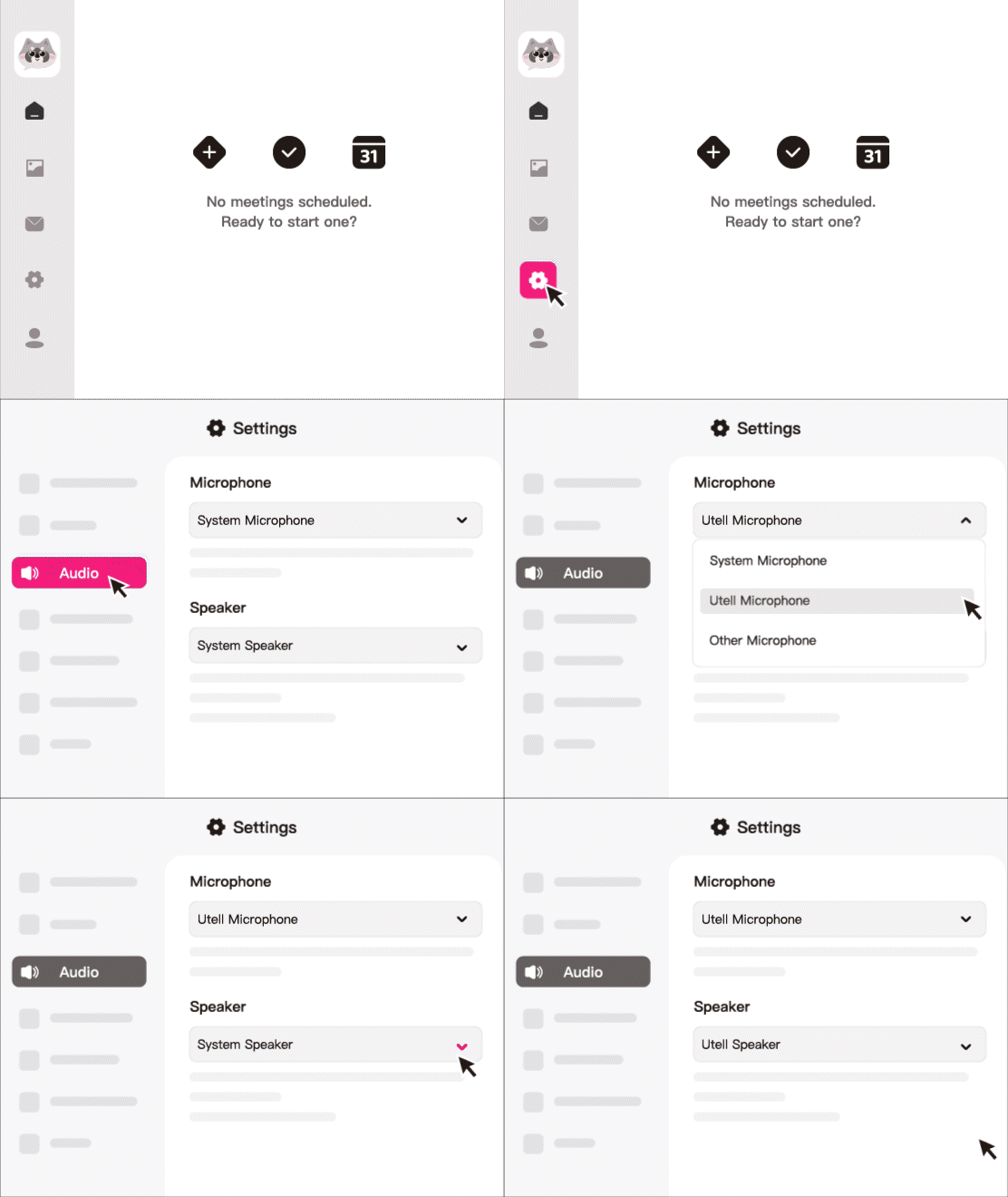
How To Set Utell AI
Step1
Go to audio settings
Step 2
Set the microphone to“Utell Microphone"
Step 3
Set the speaker to“Utell Speaker”
FAQ
How does Utell AI improve understanding during virtual classes?
Utell AI converts teachers’ and classmates’ accents into a familiar accent in real time, helping students understand explanations more clearly. This reduces cognitive load and prevents miscommunication during fast-paced virtual lessons.
Can Utell AI help students follow complex subjects more easily?
Yes. Subjects like math, biology, or programming often involve unfamiliar terminology. Accent conversion ensures pronunciation is clear and consistent, helping students focus on the content—not on decoding unfamiliar accents.
Does Utell AI work with all major virtual learning platforms?
Absolutely. Utell AI supports Zoom, Google Meet, Microsoft Teams, Skype, Webex, and most browser-based classroom platforms. Students simply route their audio through Utell AI to receive accent-adjusted speech in real time.
Is Utell AI helpful for students who are non-native English speakers?
Very much so. Non-native speakers often struggle when multiple accents appear in one virtual class. Utell AI normalizes speech patterns so everyone sounds easier to understand, boosting confidence and participation.
Can Utell AI convert both teacher and student voices during group discussions?
Yes. Utell AI processes all incoming audio—teachers, classmates, group members, or guest speakers. In virtual breakout rooms, it ensures everyone communicates in an accent that is easier for the listener to comprehend.
Does Utell AI help reduce fatigue during long virtual learning sessions?
Definitely. Constantly interpreting unfamiliar accents drains mental energy. By simplifying speech, Utell AI helps students stay focused longer, reduces listening fatigue, and improves overall retention during long online classes.