

Close Deals Faster: Standardized Accent Clarity for Every HubSpot CRM Call
Utell AI integrates directly with your HubSpot call system to deliver instant, low-latency accent conversion to Standard English. Eliminate auditory confusion during critical sales calls, ensuring prospects fully grasp your pitch. Boost clarity by 99% and reduce friction, leading to 15% higher lead conversion rates.

Why Utell AI Accent Converter Is a Must-Have For HubSpot CRM Call
Auditory friction tanks sales calls, causing confusion and requiring frustrating repetition. Utell AI is a must-have, delivering every pitch with a standardized voice, ensuring 99% clarity. This immediate comprehension keeps focus on the deal, dramatically increasing trust and accelerating sales cycles.
AI-Powered Accent Converter Features
Low Latency (>100 ms)
Utell AI processes speech using local, highly optimized AI models to achieve processing speeds of under 100 milliseconds (ms). This is significantly faster than the 250 ms human perception threshold for conversational delay.
Deep Noise Cancellation
Utell AI Noise Cancellation filters every call with precision—silencing nearby voices, clatter, and chaos—so only the active speaker comes through loud and clear.
Voice Preservation
Maintains natural voice quality and clarity while intelligently removing background noise, ensuring authentic speech at 98% accuracy
How Can HubSpot Call Benifit from Utell AI Accent Conversion
Utell AI standardizes accents for 99% clarity, cutting sales confusion and dramatically accelerating your HubSpot deal flow.
Accelerated Deal Pipeline
Utell AI boosts conversion by ensuring the prospect hears a clear pitch. 99% clarity reduces callbacks and 15% friction, accelerating the HubSpot sales cycle flow.
Increased Customer Trust
Standardized audio boosts agent confidence and customer trust instantly. This vocal consistency minimizes communication errors, leading to 20% fewer misunderstandings per HubSpot call.
Global Team Consistency
Global teams leverage HubSpot confidently, knowing Utell AI standardizes every outreach. This opens 20+ international markets by guaranteeing immediate, professional voice clarity.
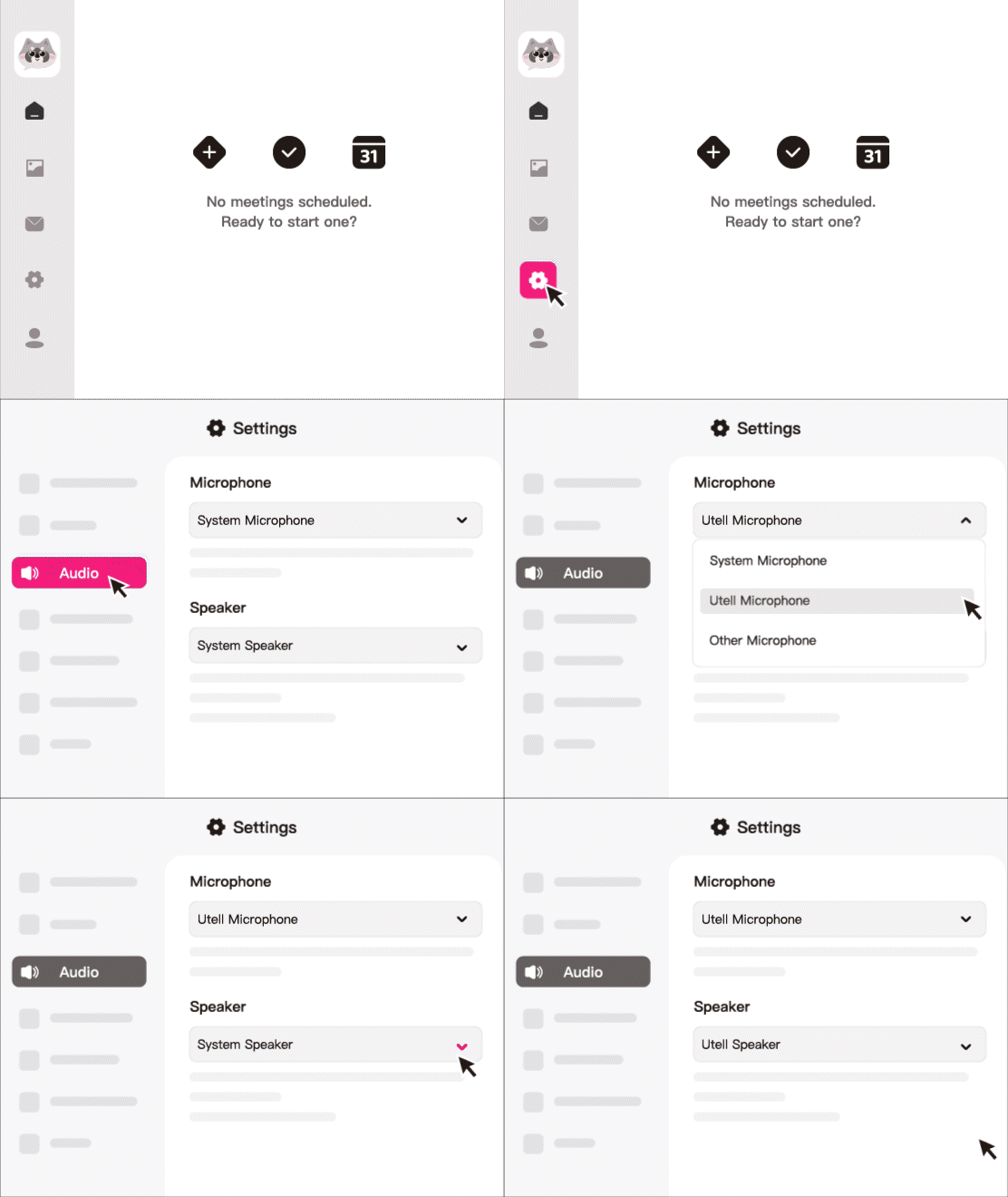
How To Set Utell AI
Step1
Go to audio settings
Step 2
Set the microphone to“Utell Microphone"
Step 3
Set the speaker to“Utell Speaker”
FAQ
How does Utell AI improve call clarity for HubSpot users?
Utell AI removes strong regional accents in real time, converting speech into clear, standard English. This helps HubSpot callers communicate more effectively with prospects and customers, especially in sales, support, and onboarding calls.
Can Utell AI help increase conversion rates during HubSpot sales calls?
Yes. When callers sound clearer and easier to understand, prospects are more likely to stay engaged, trust the speaker, and respond positively. Sales teams often see higher meeting acceptance and smoother qualification calls.
Does Utell AI integrate directly with HubSpot?
Utell AI works alongside HubSpot by transforming your voice before it reaches the call recipient. You simply run Utell AI during any HubSpot VoIP or browser-based call (HubSpot Calling, Aircall integrated with HubSpot, Zoom connected to HubSpot, etc.). No direct plug-in is required.
Will the accent conversion delay or slow down my HubSpot calls?
No. Utell AI runs in real time with ultra-low latency (typically <200 ms), so your conversation feels completely natural. You speak normally, and the listener hears your voice in a clear, neutral accent instantly.
Can Utell AI protect caller identity during HubSpot outreach?
Yes. Utell AI automatically maintains your vocal style while neutralizing accent patterns, making your voice more professional—but still yours. It’s not a full “voice changer,” so it won’t hide your identity, but it enhances professionalism and consistency across teams.
Is Utell AI helpful for international HubSpot teams?
Absolutely. Global teams often have agents from different linguistic backgrounds. Utell AI helps standardize call quality across regions, making it easier for US-based customers to understand agents from LATAM, APAC, India, and EMEA. This improves CSAT, decreases call duration, and reduces miscommunication.