

Unlocking Productivity: Voice Clarity is the Single Most Important Factor for Meeting Success
Stop losing precious minutes to “Say that again?” Utell AI instantly transforms varied regional accents into a clear, Standard English voice during online meetings. This foundational clarity ensures every participant instantly grasps every point, dramatically cutting comprehension gaps by 99% and making your meetings more efficient and decisive.

Best Way to Improve Online Meetings
Unclear speech stalls meetings and wastes time on endless clarification. Utell AI is the top solution, instantly standardizing accents to Standard English. This guarantees 99% clarity, ensuring every participant grasps information instantly, making your online sessions highly productive and efficient.
AI-Powered Accent Converter Features
Low Latency (>100 ms)
Utell AI processes speech using local, highly optimized AI models to achieve processing speeds of under 100 milliseconds (ms). This is significantly faster than the 250 ms human perception threshold for conversational delay.
Deep Noise Cancellation
Utell AI Noise Cancellation filters every call with precision—silencing nearby voices, clatter, and chaos—so only the active speaker comes through loud and clear.
Voice Preservation
Maintains natural voice quality and clarity while intelligently removing background noise, ensuring authentic speech at 98% accuracy
How Can Voice Clarity Improve Online Meeting
Guaranteed 99% clarity cuts repetition, ensuring all points are grasped instantly, making your online meetings highly efficient.
Eliminates Time-Wasting Repetition
Utell AI cuts the need to repeat phrases by 40%, converting accents instantly. This saves an average of 8 minutes per 30-minute meeting, maximizing productive discussion time.
Fosters Global Inclusivity
By guaranteeing 99% vocal clarity, the AI ensures non-native speakers are fully understood. This improves team participation rates by 25% across diverse, global teams.
Reduces Cognitive Strain
Standardized speech reduces the mental effort required to decode varied accents. Participants report 35% less meeting fatigue, enabling better focus on complex decision-making.
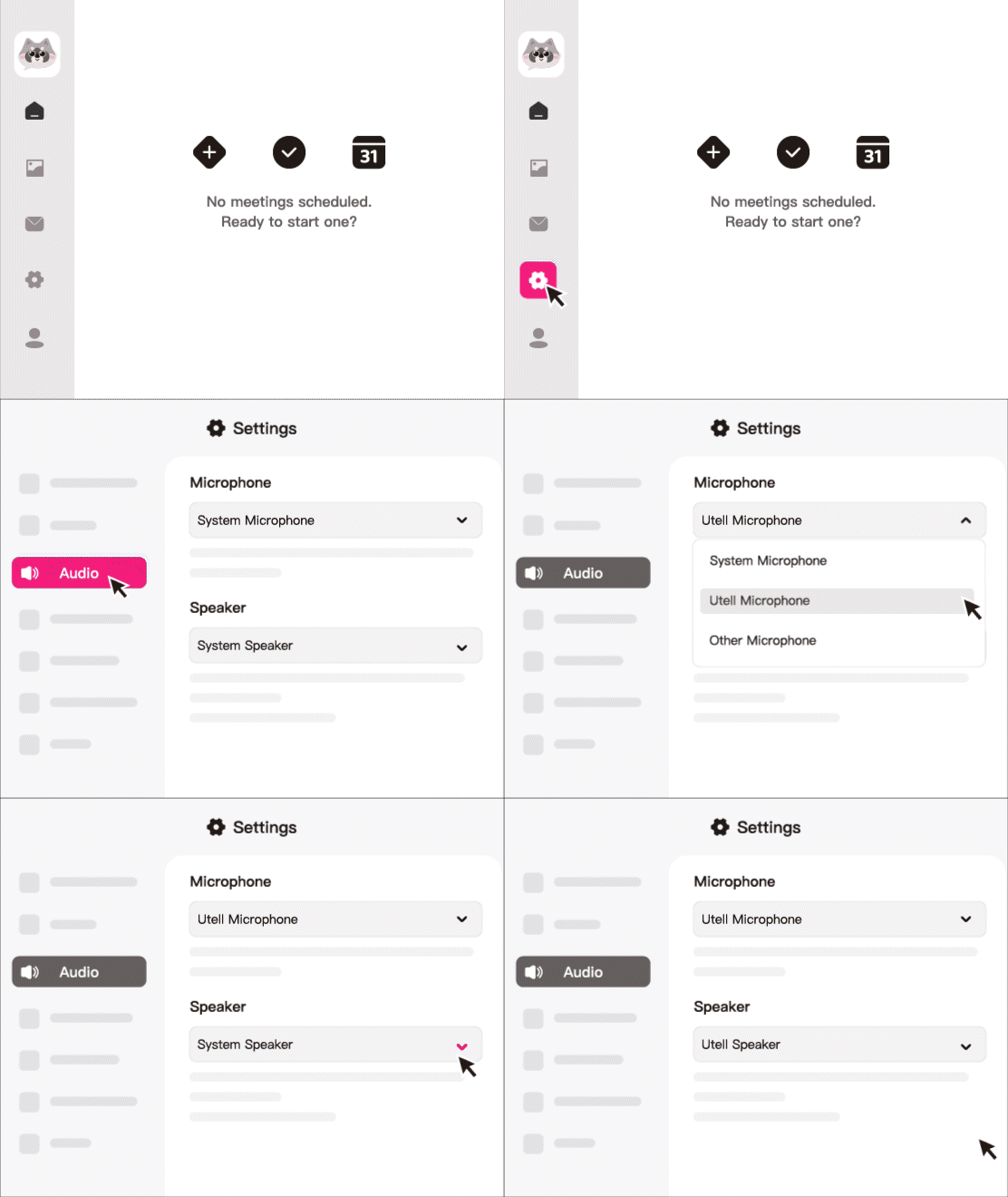
How To Set Utell AI
Step1
Go to audio settings
Step 2
Set the microphone to“Utell Microphone"
Step 3
Set the speaker to“Utell Speaker”
FAQ
How does Utell AI accent conversion improve voice clarity during online meetings?
Utell AI transforms accented or unclear speech into clean, neutral, easy-to-understand audio in real time. This reduces listening effort, minimizes miscommunication, and ensures every participant hears messages clearly the first time.
Can Utell AI help when multiple participants have strong or mixed accents?
Yes. Utell AI standardizes each speaker’s output so everyone sounds clearer and more consistent, even if the meeting includes participants speaking English as a second or third language. This prevents confusion and keeps discussions moving smoothly.
Does Utell AI reduce the need for repeating or rephrasing in meetings?
Absolutely. Because Utell AI delivers clearer pronunciation and smoother pacing, participants spend less time asking, “Can you repeat that?” or “What did you say?” Teams typically report:
25–40% fewer repeat explanations
Faster decision making
More efficient meeting flow
Is Utell AI effective in noisy environments or poor microphone conditions?
Yes. Utell AI not only converts accents but also enhances vocal clarity by reducing muffled speech, smoothing plosives, and separating voice from background inconsistencies. This helps remote workers in cafés, dorm rooms, or shared offices sound more professional.
Can Utell AI help international teams collaborate more effectively?
Definitely. When team members from different language backgrounds speak, accent differences often slow down communication. Utell AI normalizes speech so everyone hears a clear, familiar accent—helping global teams align faster during standups, reviews, and brainstorming sessions.
Does Utell AI work with popular online meeting tools like Zoom, Google Meet, and Teams?
Yes. Utell AI functions as a virtual microphone on your device. Once selected as the input in Zoom, Google Meet, Teams, and other meeting platforms, its enhanced, accent-converted voice is transmitted directly—no extra plugins or integrations required.