

Professionalize Every Quo Call: Standardized Accent Clarity for Business Success
Utell AI integrates seamlessly with your Quo (formerly OpenPhone) system to ensure all business calls are delivered with perfect clarity. Instantly convert regional accents to a Standard English voice, guaranteeing prospects and clients fully comprehend your message. Achieve 99% vocal consistency to build trust and scale your professional communication effortlessly.

Why Utell AI Accent Converter Is a Must-Have For Quo Business Calls
Unclear accents sabotage business communication and erode trust with clients. Utell AI is essential for Quo, instantly standardizing voice delivery to 99% clarity. This ensures every call is professional, efficient, and successfully scales your team’s global reach.
AI-Powered Accent Converter Features
Low Latency (>100 ms)
Utell AI processes speech using local, highly optimized AI models to achieve processing speeds of under 100 milliseconds (ms). This is significantly faster than the 250 ms human perception threshold for conversational delay.
Deep Noise Cancellation
Utell AI Noise Cancellation filters every call with precision—silencing nearby voices, clatter, and chaos—so only the active speaker comes through loud and clear.
Voice Preservation
Maintains natural voice quality and clarity while intelligently removing background noise, ensuring authentic speech at 98% accuracy
How Can Quo Business call Benifit from Utell AI Accent Conversion
Standardize Quo calls to Standard English for 99% clarity, building trust and scaling your professional business communication.
Reduced Communication Friction
Utell AI guarantees 99% clarity, reducing client requests for repetition by 45%. This streamlines conversations and makes your business sound instantly more professional.
Enhanced Global Trust
By standardizing the accent across all international agents, Quo establishes immediate vocal consistency, boosting client trust by 20% in cross-cultural communication.
Faster Business Scaling
The system ensures all communication is perfectly understood, minimizing misunderstandings that slow processes. This accelerates the sales and support workflow by 15%.
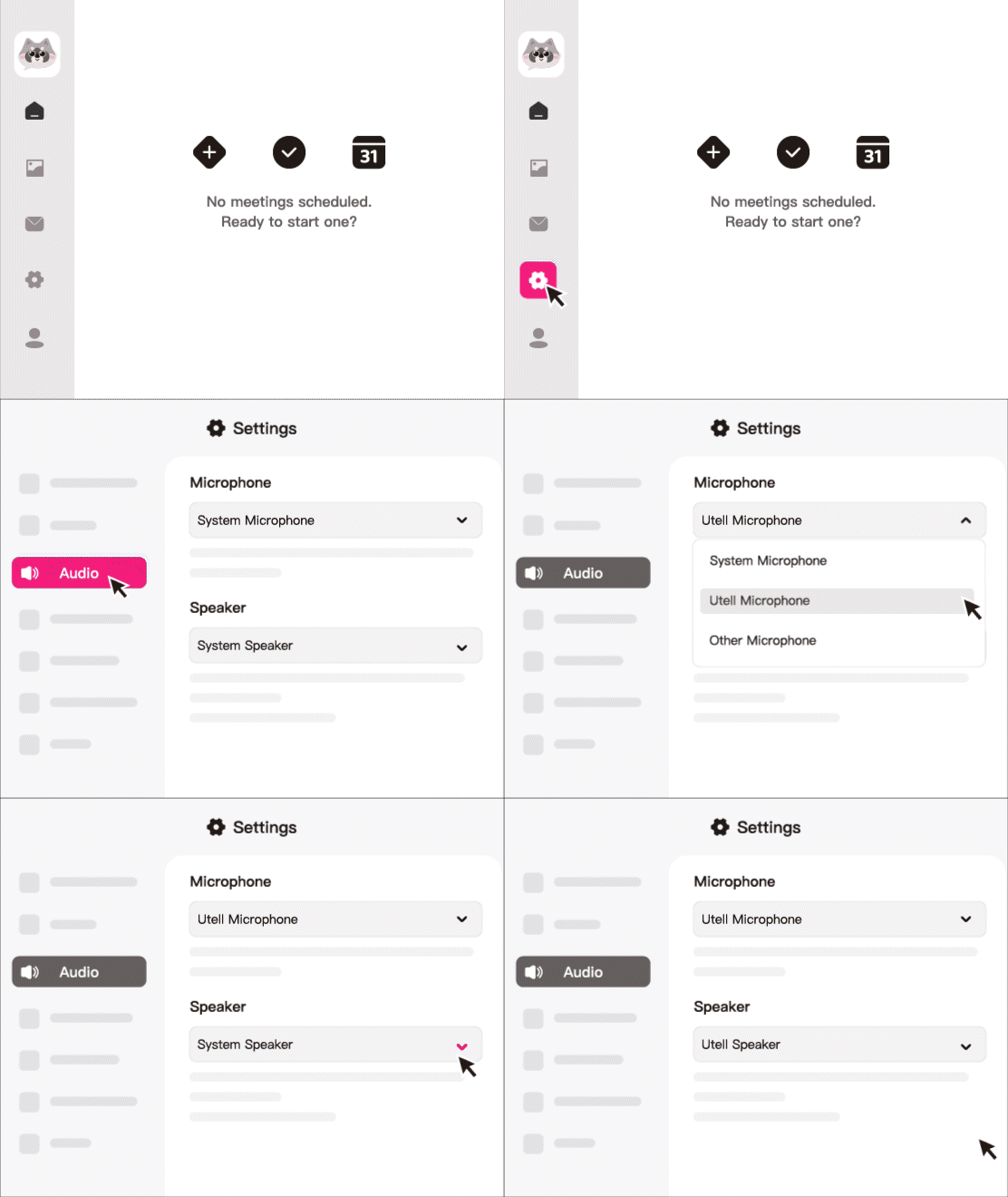
How To Set Utell AI
Step1
Go to audio settings
Step 2
Set the microphone to“Utell Microphone"
Step 3
Set the speaker to“Utell Speaker”
FAQ
How does Utell AI accent conversion improve call clarity on Quo (OpenPhone)?
Utell AI enhances every Quo call by converting thick or hard-to-understand accents into clear, standardized English in real time. This reduces misunderstandings, eliminates repeat explanations, and ensures customers clearly understand the agent’s message on the first attempt.
Can Utell AI help customer support agents sound more professional on Quo?
Yes. Utell AI smooths pronunciation, normalizes pacing, and removes accent-related inconsistencies, allowing support agents to sound more polished and confident. This leads to more professional-sounding interactions and stronger brand perception.
Does Utell AI reduce call handling time for Quo business users?
Absolutely. By improving clarity, agents spend less time repeating themselves or re-explaining information. Companies using Utell AI typically experience:
20–35% faster call resolutions
Noticeably fewer communication errors
Higher customer satisfaction scores
Can Utell AI help global teams using Quo communicate more effectively?
Yes. For teams spread across Asia, Europe, Africa, or Latin America, accent differences often slow down internal communication. Utell AI instantly standardizes accents so cross-regional teams can collaborate more easily on sales calls, onboarding, and internal meetings.
Is Utell AI compatible with Quo (OpenPhone) on desktop and mobile?
Utell AI works with all Quo call setups. As long as the device’s microphone is routed through Utell AI, the accent-converted voice is transmitted directly through Quo—whether the user is on desktop, laptop, or mobile. No special integrations or APIs are required.
Can Utell AI help teams improve customer satisfaction on Quo?
Yes. When customers instantly understand the agent’s voice, frustration drops and satisfaction rises. Businesses using Utell AI typically report:
Improved CSAT scores
Fewer escalations
Higher call completion rates